Quick Answer: How to Tell if Your Computer Has a Virus
If your computer suddenly slows down, shows repeated pop-ups, redirects your browser, or changes settings without permission, those are common signs of malware. In 2026, many threats avoid obvious alerts, so persistent performance issues, altered security settings, and unusual network activity are stronger indicators than a single warning.
Quick Self-Check
If you notice three or more of the following happening repeatedly, your computer may be infected:
- Ongoing slow performance, overheating, or unusually loud fans while idle
- Rapid battery drain or high system activity with no apparent cause
- Browser redirects, persistent pop-ups, or fake update alerts
- Homepage, search engine, or browser settings are changing without permission
- Antivirus, firewall, or security tools are disabled or failing to update
- Emails or messages sent from your accounts that you didn’t send
- Problems return after restarting or basic cleanup
This checklist focuses on patterns, not one-time glitches. If these issues persist for 24–48 hours or continue after a restart, malware becomes the more likely explanation.
If this matches what you’re seeing, take these steps:
- Disconnect from the Internet to limit further activity.
- Run a full-system scan with trusted security software.
- Review recent installs or browser extensions and reduce exposure to suspicious or malicious sites while you investigate.
If you already use PrivadoVPN, adding Privado Sentry at this step provides real-time antivirus scanning, while Threat Protection helps prevent repeat exposure.
How to Tell if Your Computer Has a Virus: 15 Tell-Tale Signs
Cybercrime continues to rise year over year, with modern malware increasingly focused on quiet data collection, ad fraud, and credential theft rather than apparent system damage. That shift makes early detection more critical than ever.
1. Sudden Performance Slowdowns
A noticeable drop in speed is one of the most common warning signs. Malware often uses system resources in the background, which can make even simple tasks feel sluggish.
2. Frequent Pop-Ups or Fake Alerts
Unexpected warnings about security issues, prizes, or urgent actions are a red flag. Legitimate operating systems and software rarely rely on constant pop-up alerts.
3. Browser Redirects You Didn’t Ask For
If searches or links suddenly send you to unfamiliar websites, something may be interfering with your browser. In 2026, this often occurs via injected scripts or malicious browser extensions that modify results before pages load. Redirects tied to fake shopping sites, copycat login pages, or sketchy software offers are prevalent warning signs.
4. Unknown Programs Starting Automatically
Malware often adds itself to startup processes. If new apps launch when your computer boots and you don’t recognize them, that’s worth investigating.
5. Unusual Network Activity
A system sending or receiving data when you aren’t actively using the Internet can indicate malicious background processes communicating with external servers.
6. Security Settings Changed Without Permission
When security settings change without your input, it usually isn’t accidental. Malware may disable firewalls, reduce browser protections, or evade antivirus scans. These changes are often subtle and easy to miss unless you regularly review your system settings.
7. Overheating or Loud Fan Noise
Persistent high CPU usage from hidden processes can cause excessive heat and constantly running fans.
8. Emails or Messages Sent From Your Accounts
Friends receiving strange emails or messages from you is a serious sign. Some malware hijacks accounts to spread further.
9. Files or Apps Missing or Renamed
Ransomware and destructive malware may delete, lock, or rename personal data during an attack.
10. System Crashes or Freezes
Frequent crashes, blue screens, or frozen apps can indicate deeper system interference.
11. Antivirus Disabled or Won’t Run
If security software suddenly stops working or refuses to update, malware may be blocking it.
12. Battery Draining Faster Than Normal
On laptops, unexplained battery drain often points to background activity you didn’t initiate.
13. Webcam or Microphone Activating Unexpectedly
Indicator lights turning on without permission may suggest spyware.
14. Fake Software Update Prompts
Fake update prompts are among the most effective methods of infection in 2026. These alerts often imitate browsers, media players, or system tools and appear while browsing normal websites. If an update request doesn’t come directly from the software itself or the operating system, it’s a strong signal that something isn’t right.
15. Search Engine or Homepage Changes
If your default search engine or homepage switches without consent, that’s often tied to browser-based malware.
What to Do If You Think Your Computer Has a Virus
Start by disconnecting from the Internet to limit further activity. Run a full-system scan with trusted security software, and review recently installed programs. If problems persist, restoring from a clean backup or seeking professional help may be necessary.
Virus vs. Legitimate Software Issues
Not every problem points to malware. The difference usually comes down to control and repetition. A legitimate software issue tends to be isolated and explainable, whereas malware-driven behavior tends to be persistent and unauthorized.
- Virus-related behavior: settings change on their own, issues return after restarts, security tools stop working
- Legitimate issues: temporary slowdowns during updates, high usage from known apps, changes you can trace back to an install or update
If behavior continues after restarts and scans, malware becomes the more likely explanation.
Why Malware Is Harder to Spot in 2026
Modern threats are designed to stay quiet. Instead of causing noticeable damage, many focus on tracking activity, stealing credentials, or monetizing your system through ads and background processes. That’s why subtle changes often matter more than dramatic ones.
Signs That Are Often False Alarms
Not every odd behavior means your computer has a virus. Legitimate software updates can temporarily slow performance, browser extensions may change search behavior, and high system usage can occur during backups or indexing. The key difference is persistence. Malware-related issues tend to repeat, worsen over time, or reappear after restarts.
How PrivadoVPN Helps Reduce Online Threat Exposure
If you notice early warning signs but haven’t confirmed an infection yet, reducing exposure matters immediately. Many infections begin with malicious ads, spoofed update pages, or redirect chains triggered while browsing.
While a VPN doesn’t replace antivirus software, it does reduce exposure to common attack paths. PrivadoVPN encrypts Internet traffic, hides your IP address, and includes Threat Protection features that actively block known malicious domains. This is especially effective against fake update pages, malicious redirects, and scam-heavy ad networks that often serve as the entry point for modern malware.
Using PrivadoVPN Premium alongside antivirus software helps cut off those entry points before damage occurs.
PrivadoVPN Premium also adds:
- Threat Protection to block harmful sites and trackers
- Ad Blocker to reduce malicious advertising
- Secure DNS to prevent DNS-based attacks
- Kill Switch to protect traffic if the connection drops
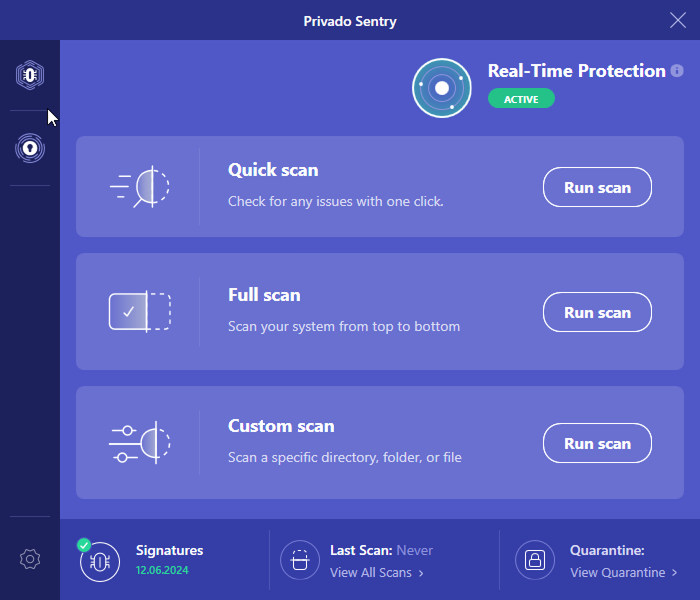
Subscribers can also add Privado Sentry, PrivadoVPN’s antivirus program, for on-device malware detection and removal. When used together, network-level blocking helps prevent threats from reaching your system, while Privado Sentry handles active infections.
These layers make it harder for malicious sites to reach your system in the first place.
If you’re still unsure after reviewing the warning signs, acting early limits damage. Pairing system scans with stronger network-level protection reduces the chance of repeat exposure while you investigate.
The Smart Way to Spot and Stop a Virus
If you’re wondering how to tell if your computer has a virus, trust patterns, not just alerts. Performance changes, altered settings, and strange behavior usually signal a deeper issue. Pairing good security software with tools like PrivadoVPN Premium adds another layer of defense against modern threats.
Frequently Asked Questions
Yes. Modern malware often uses obfuscation or delays activity to avoid detection. That’s why behavioral warning signs still matter even when scans appear clean.
Not always. Network congestion or background updates can cause slowdowns, but persistent slow speeds combined with redirects or pop-ups are more suspicious.
Yes. Malicious ads, fake update prompts, and compromised sites can trigger infections without obvious user interaction.