What Is Split Tunneling and How It Works
Split Tunneling, PrivadoVPN’s version of split tunneling, gives users precise control over which apps and websites use the VPN connection and which connect directly through their regular Internet. It’s designed to help maintain security and privacy without sacrificing speed or convenience. By routing only selected traffic through the VPN, Split Tunneling lets you optimize performance and balance privacy with everyday usability.
Why Use Split Tunneling?
Split Tunneling helps you customize how PrivadoVPN works with your apps and devices. Instead of sending all Internet traffic through the VPN, you decide which apps or sites do so. This is especially useful when you want to:
- Keep banking or location-sensitive apps outside the VPN to avoid verification issues.
- Stream local services while still protecting other apps through the VPN.
- Prioritize bandwidth-heavy applications for faster performance.
- Maintain privacy for sensitive browsing while keeping public or low-risk traffic direct.
By controlling traffic flow, Split Tunnelinghelps reduce unnecessary encryption overhead and improves overall Internet speed. It’s a great solution for users who need flexibility without compromising security.
Split Tunneling Features and Benefits
- App and Domain Control: Choose exactly which apps or websites go through the VPN and which use your direct Internet connection. This lets you fine-tune how PrivadoVPN interacts with different tools, browsers, or online platforms.
- Improved Speed and Efficiency: Because only selected traffic passes through encrypted VPN tunnels, your Internet connection can remain faster for everyday use. Encryption adds security, but Split Tunneling keeps performance high by applying it only where needed.
- Enhanced Compatibility with Services: Some websites and apps don’t work properly under VPN connections, especially streaming or location-locked platforms. Split Tunneling solves this by letting you bypass the VPN for those specific services while keeping protection active elsewhere.
- Customizable Rules for Every Scenario: Once configured, Split Tunneling automatically applies your chosen settings every time you connect. You can adjust or expand your rules anytime to adapt to changing needs.
- Privacy Without Compromise: Sensitive apps and browsing sessions stay encrypted and secure through PrivadoVPN’s tunnel, while other non-critical Internet traffic goes directly to maximize speed and stability.
- Balanced Bandwidth Usage: Split Tunneling helps distribute bandwidth efficiently by reserving encryption overhead for private or high-risk data, improving network balance across devices.
- Convenient One-Time Setup: After initial configuration, Split Tunneling continues to apply your preferences in the background, maintaining consistent behavior without manual switching.
How to Set Up Split Tunneling in PrivadoVPN
- Open the PrivadoVPN app on your device.
- Sign in with your Premium account credentials.
- Go to Settings and find the Split Tunneling section.
- Check the “Allow some applications to connect via a secure tunnel…” box, then use the Bypass or Tunnel radio buttons to decide which apps will use the VPN and which will not.
- Add the apps or websites you want to include or exclude from VPN protection.
- Save your changes.
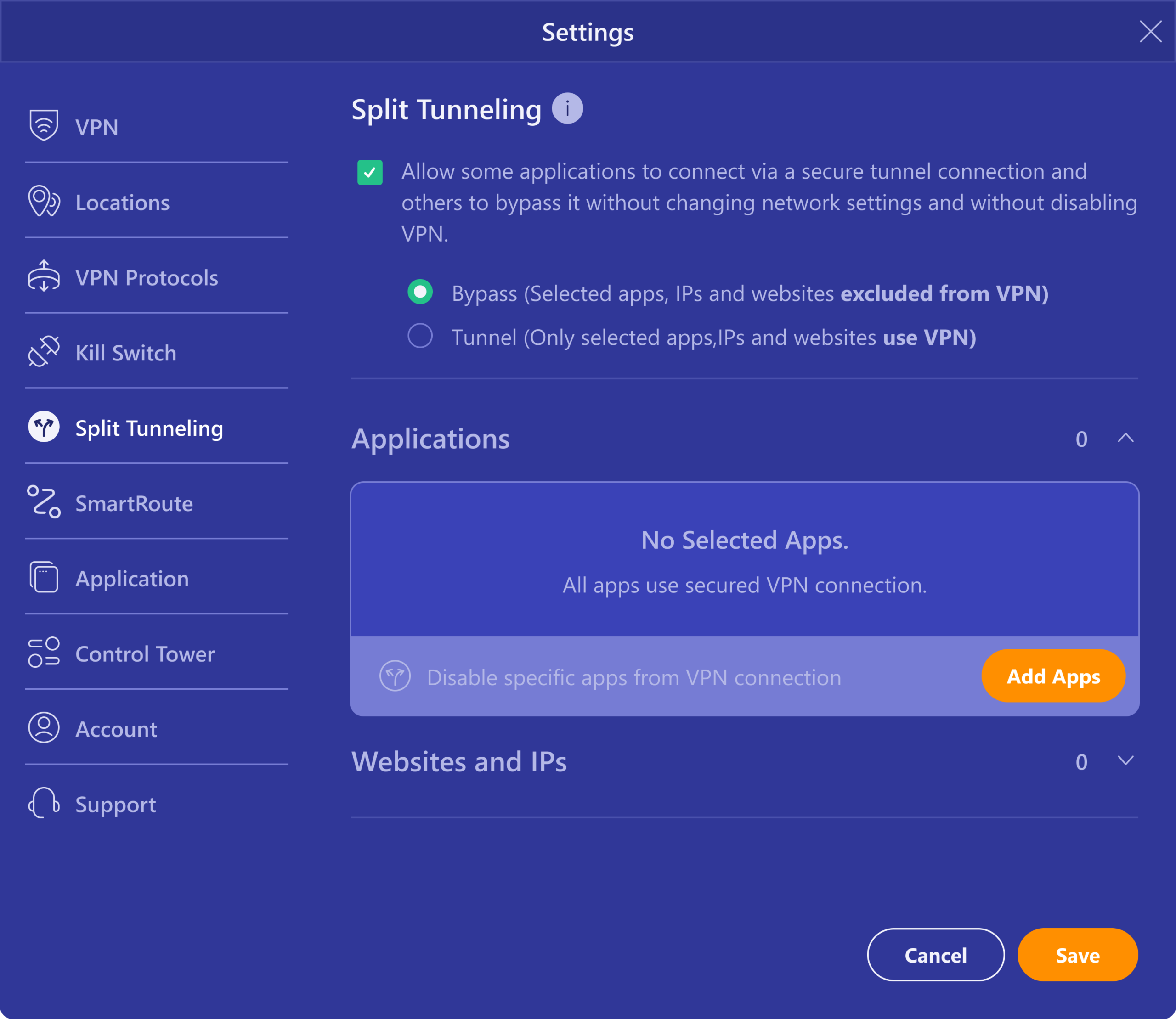
Once configured, PrivadoVPN will automatically route traffic based on your Split Tunneling rules. You can edit these rules anytime to adjust your VPN behavior.
Take Full Control with PrivadoVPN Premium
Split Tunneling is available for PrivadoVPN Premium subscribers. To take advantage of advanced connection control, faster performance, and enhanced privacy tools, upgrade to Premium. PrivadoVPN Premium also includes access to 67 global locations, unlimited VPN bandwidth, and Control Tower security features.